
Click “Get it from Microsoft Store” above to open the FormDD listing.
FormDD is now available on the Microsoft Store.
Install on Windows
Download & install FormDD
Install from the Microsoft Store when you can — it is the simplest path. If you need the Setup file directly, use the GitHub alternative below.
Install from the Microsoft Store
Recommended for Windows PCs that can reach the Microsoft Store.
Choose Get or Install as shown in the Store, then wait until setup finishes.
Launch it from the Start menu. You can try the bundled sample forms right away.
Alternative — Setup from GitHub
Use this when you want the Setup file directly. During install, Windows may show a blue “Unknown publisher” warning — this is normal for apps from a small developer, not a virus.
Click the Setup button above. The file lives on GitHub Releases, which that button points to. You get FormDD-Setup-x.y.z.exe. Do not download it from anywhere else.
If Microsoft Edge warns “this file isn’t commonly downloaded”, choose Keep when you downloaded from the official link above. If the prompt below appears, click the arrow next to Delete and select Keep anyway. Then open the downloaded file.
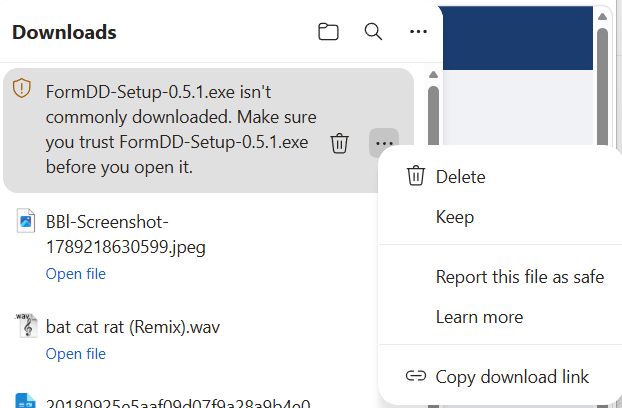
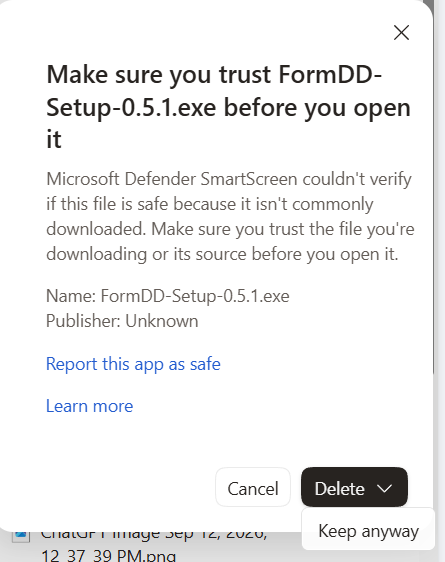
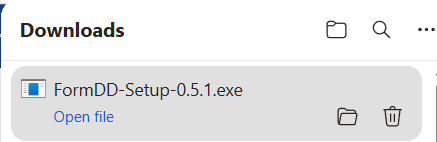
This is the blue SmartScreen screen, not an admin-permission prompt. Click More info, then Run anyway — the button only appears after you click More info.
In Select Setup Language, choose your preferred language (Thai is selected in this example), then click OK.
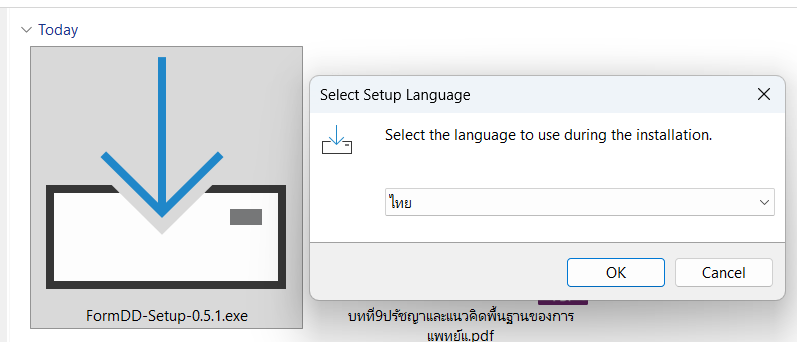
Click Next through the wizard. Setup installs into your user folder. No administrator rights are needed — do not “Run as administrator”.
Launch it from the desktop icon. You can try the sample forms right away — no key needed.
Why does Windows say “Unknown publisher”?
This warning usually appears when you install from the Setup file directly. Windows flags any app that doesn’t yet carry a code-signing certificate it recognizes. FormDD is built by a small team and that certificate is still being arranged — so the warning shows as a precaution. It does not mean the file has a virus or was tampered with.
To be sure before installing: (1) only download from the official link, (2) verify the file’s SHA256 (below), (3) scan with Windows Defender or upload it to virustotal.com.
For IT — verify the file with SHA256
Every release ships a SHA256SUMS.txt on its Release page. Open PowerShell and run:
Get-FileHash .\FormDD-Setup-x.y.z.exe -Algorithm SHA256Compare the value with the matching line in SHA256SUMS.txt. If they match, the file is intact and untampered.
Open Windows Security → Protection history → pick the FormDD item → Allow / Restore.
The installer does not need administrator rights. If the file vanished, restore it from Defender (above) and download again from the button on this page. Do not run Setup as administrator — it would install into a different folder from your saved work.
Settings → Apps → search “FormDD” → Uninstall. Your saved work stays until you delete it yourself.